On this page
- Quick Recap
- So, What Counts as a Product Demo Video?
- A Simple 5-Beat Script for Your Demo Video
- What Belongs on Screen, and What Hurts You Later
- Three Ways to Make a Product Demo Video
- How to Tell Which Part of Your Demo Ad to Fix
- Three Real Demo Ads and the Rule Each One Shows
- Making Demo Ads Without a Film Crew
- Final Thoughts
- FAQs
Quick Recap
- A product demo video earns the sale by showing the product change something on screen, so the type you pick should answer the buyer's biggest doubt, such as "does it work" or "why not keep what I have".
- A demo ad should start at 15 seconds and work as a complete ad within them, because many viewers never reach second 16, and a key action that will not fit usually means too many messages rather than too little time.
- The script is easiest to write backward, from one key action to the result and then to a hook that shows the same problem, which keeps the promise of the first 3 seconds and the proof in the middle in line.
- Each shot should prove something a photo cannot, like the real mechanism or the size next to a hand, since a vague or wrong demo may sell at first and then come back as refunds and bad reviews.
- The way you make demos should follow the product's stage, with cheap angles while it is unproven and paid creators only after an ad wins, and the test numbers then show which part of the ad to change.
So, What Counts as a Product Demo Video?
A product demo video (also called a product demonstration video) shows a product in use, from the first action to the result. It answers the buyer's first question: does it work?
It is not the same as an explainer video. An explainer talks about a product, often with animation. A product demo video shows the real product doing its job.
It is not the same as an ad either. As Shopify's guide to product demo videos puts it, an ad is a paid placement that may or may not show how to use the product, while a demo always does.
The practical line is a mute test. With the sound off, a demo still shows something change: the bag goes flat, the cheese falls out. If nothing changes, the video sells a mood, and a product with no reviews rarely sells on mood.
Which Type of Demo Video Fits Your Product
The right type depends on where the video runs and which doubt it has to remove.
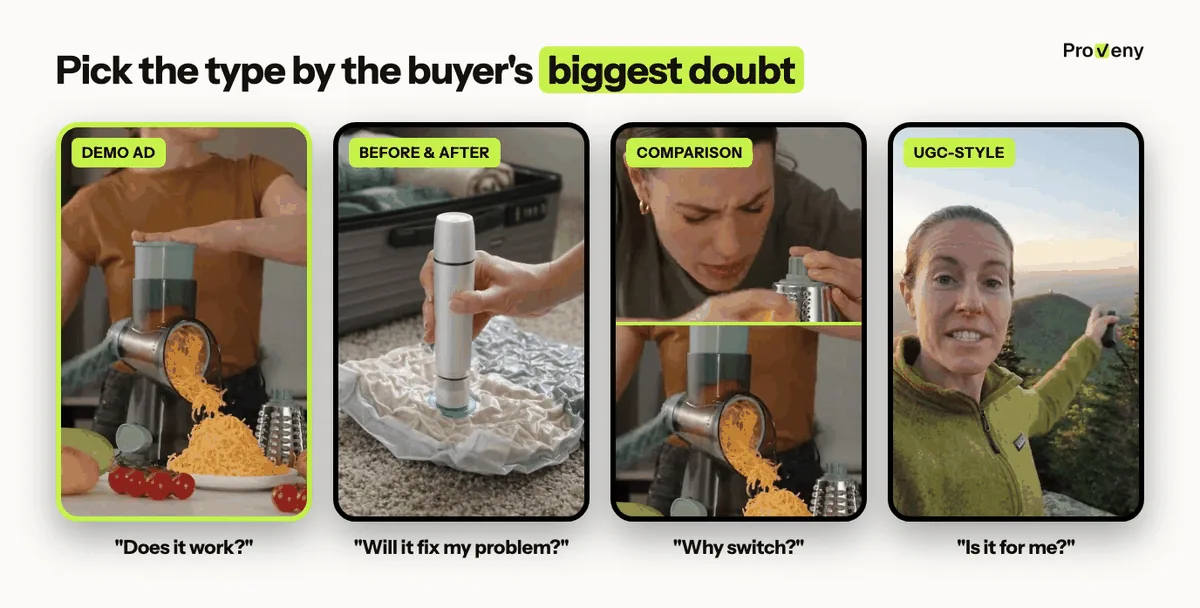
| What it shows | Buyer's doubt it removes | Best for | |
|---|---|---|---|
| Demo ad | The key action in the first seconds, then the result | "Does it really work?" | TikTok, Reels, Shorts, Meta feed |
| Before and after | The problem, then the same scene fixed | "Will it fix my problem?" | Cleaning, beauty, home, storage and car products |
| Comparison | Your product next to the usual way of doing the task | "Why not keep what I have?" | Products that replace something people own |
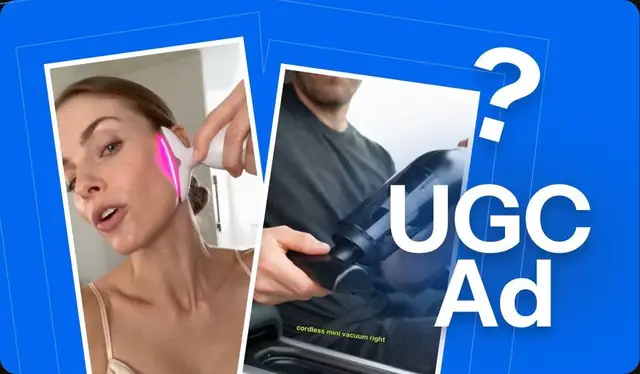
| UGC-style demo | A person talks to the camera, then shows the product working | "Is it for someone like me?" | Products bought on trust, such as gadgets and outdoor gear |
| How it works video | Each step of use, in order | "How do I use it?" | Product page, FAQ, post-purchase emails |
The type should follow the product's main objection, not what looks good in the feed. A rotary grater competes with the box grater in every kitchen drawer, so a comparison hook does the selling.
A common mistake is to run a step-by-step how-it-works video as an ad: the key action arrives at second 10 or later, after most viewers have scrolled on. The same footage, cut so the result comes first, makes a demo ad.
Why Watching It Work Beats Any Product Photo
Product demo videos sell because they replace trust the product has not earned yet. A buyer cannot touch the product, so the video has to prove it for them.
Image: Sound off, 3 seconds: one turn of the handle explains the grater.
It removes doubt fast. Questions such as "Does it fold?", "Does it fit?" or "Is it strong enough?" get a 2-second answer on screen, which beats a line of text.
It stops the scroll. Motion and an unexpected result catch the eye faster than a product on a white background.
One test sums up a demo ad: can a viewer with the sound off tell what the product does within 3 seconds? Polish does not help it pass. A glossy studio ad reads as an ad and often gets skipped as one.
How Long Should a Product Demo Video Be?
A product demo ad should be 15 seconds to start, and 30 seconds only when the product has a second use worth showing. Length depends on placement:
| Recommended length | |
|---|---|
| Ad on TikTok, Reels or Shorts | 15 seconds; 30 seconds for a second use case |
| Product page | 30 to 60 seconds |
| YouTube or website tutorial | As long as the steps need (Shopify notes these often run two to five minutes) |
The deciding question for 30 seconds is whether the extra time removes a doubt the first 15 could not. Often the first 15 can: the monocular ad in this guide proves two claims, the far view and the phone clip, in 15 seconds. A second use that repeats the first one with a different object adds length, not proof.
If the key action does not fit in 15 seconds, the ad usually has too many messages, not too little time. The logo intro is the first thing to cut, because it spends the hook on something the viewer did not ask for.
Drama, UGC or demo ads. Any concept, any product.
Every ad shows your product working accurately.
A Simple 5-Beat Script for Your Demo Video
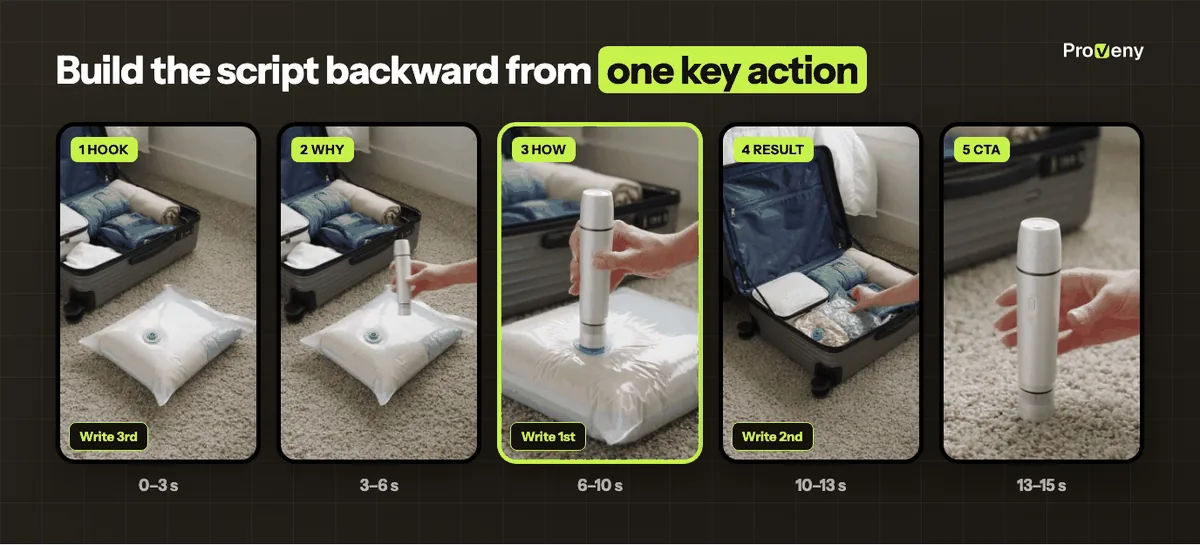
A product demo ad follows five beats in a fixed order. The timings below are for a 15-second ad.
- Hook (0 to 3 s) The problem, a reaction, or the product doing something unexpected.
- Why (3 to 6 s) The pain or the wish, meaning why someone needs this.
- How (6 to 10 s) The mechanism, with the key action close up in a real hand.
- Result (10 to 13 s) The problem solved, the "after" state.
- Hero and CTA (13 to 15 s) The product clearly in frame, with one short line such as "Link below".
The script is easier to write backward: the key action first, as one sentence, then the result it creates, then the hook as the problem that result fixes. This keeps the hook and the "how" on the same problem and avoids the costly mistake of a hook that promises something the middle never shows, which earns views but few clicks.
As a rule of thumb, natural speech runs about 2 to 3 words per second, so a 15-second ad holds roughly 30 to 45 spoken words. A script that runs long needs fewer lines, not fewer shots, because the shots are the proof.
A Filled-In Script for a Vacuum Pump
This 15-second script is for a small handheld pump that pulls the air out of vacuum storage bags. It follows the real vacuum pump ad shown in this guide.
| Shot | Line | |
|---|---|---|
| Hook | A puffy bag of sweaters on the floor next to a full, open suitcase | "My suitcase never closes." |
| Why | A hand brings the pump to the bulky bag; the suitcase is already full | "Bulky clothes take all the space." |
| How | The pump presses on the bag's valve; the air comes out and the bag goes flat | "Press, and the air comes out." |
| Result | The flat bag slides into the suitcase and the lid closes | "Now everything fits." |
| Hero and CTA | The pump upright in a hand, in sharp focus | "Link below." |
Every claim in the script needs to be something you can show and back up. If the ad says "half the space", the product listing must say so too. This guide to TikTok hooks has more opening lines.
What Belongs on Screen, and What Hurts You Later
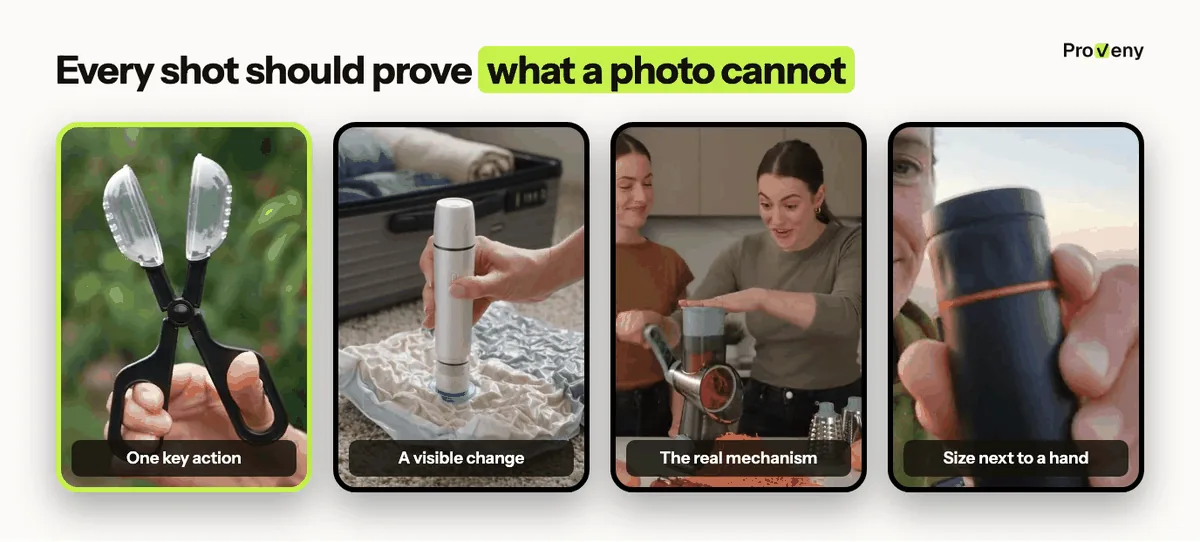
A product demo video should show one key action, in real hands, with a visible result.
Shots That Prove It
- One key action: The single motion that makes the product worth buying, such as the clip that snaps, the handle that turns, or the bag that goes flat. The shot holds long enough to read the motion, about a second or two, rather than a fast cut that hides it.
- Hands and a real place: A kitchen, a car or a garden tells the buyer where the product fits in their life.
- A visible change: Messy to clean, dark to bright, loose to tight. A change of state is the proof.
- Size: A hand, a phone or a cup next to the product shows how big it is. Size that only shows in the listing's dimensions leads to "smaller than I expected" reviews.
- A slight angle: A 45° view shows depth and parts better than a flat front view.
- Captions: Burned-in captions keep the message clear for viewers who watch with the sound off.
Shots That Cost You Later
- A frozen product: A product that sits still while the camera moves is not a demo.
- A wrong mechanism: A video that shows the product opening in a way it cannot leads to complaints and refunds once buyers receive it. The ad may sell well at first, so the cost shows up weeks later, in returns.
- Studio-only shots: A white background tells the buyer nothing about use.
- Claims you cannot show: An ad that says "waterproof" needs to show water.
A quick review rule before an ad goes live: each shot should prove something a product photo cannot.
Three Ways to Make a Product Demo Video
You can film it yourself, hire a creator, or generate it with AI. The best choice depends on whether you already stock the product and how many angles you want to test.
| Film it yourself | Hire a creator | AI video ad generator | |
|---|---|---|---|
| What you need | The product, a phone, light, editing time | The product shipped to them, a brief, a budget | A product link or photos |
| Time | Days | Days to weeks | Minutes |
| Good for | Products you already stock | Winners you want to scale | Testing new products and many angles |
The decision follows the product's stage. While a product is unproven, the cost per tested angle matters most, because most tests lose. Once an ad wins, a creator's voice is worth the price and the wait. The costly mistake is the reverse order: a creator budget spent on a product that never found a working hook.
- Filming it yourself works when you have the product in hand. The basics are a vertical (9:16) frame, daylight, and a phone fixed on a stand. Five short takes of the key action from 2 angles give the edit enough to choose from, and captions go on in the edit. The key action belongs in the middle of the frame, because TikTok and Reels lay captions and buttons over the bottom and right edges.
- Hiring a creator adds a human voice and trust, which suits UGC-style demos. The brief should name the one key action, the 5 beats and the claims the creator must not make. Shipping and turnaround make this slow, so it fits products that already sell.
- An AI video ad generator is the fastest way to get several demo ads for a product you have not stocked yet. The one thing to check first is whether the tool understands how your product works. Many AI ad tools start from a single product image, and a photo shows what a product looks like, not how it works. The result is often a frozen product or invented parts. A tool that reads the full listing (specs, use, all images) and plans shots around one key action gives a far more believable demo.
How to Tell Which Part of Your Demo Ad to Fix
A product demo video is a good base for testing, because the middle (the mechanism) stays the same and works with many openings.
- Hook first The body stays fixed while 3 different first 3 seconds compete: the problem, the result, a reaction.
- Angle next The same product can sell on time saved, on safety, or as a gift.
- Format last A selfie review, a voice-over or a commercial-style ad can all be built on the same key action.
The metrics show which beat to change. Hook rate (3-second views divided by impressions, also called thumbstop rate) measures the first 3 seconds; click-through rate (CTR) measures whether the middle proved enough.
| What it usually means | What to change | |
|---|---|---|
| Low hook rate | The first 3 seconds do not show the problem or the action | The hook only; keep the body |
| Good hook rate, low CTR | The middle does not prove the claim, or the hook promised something else | The "how" and "result" shots, or the angle |
| Good CTR, high cost per purchase | The video works; the page, price or offer does not | The product page or offer, not the video |
One change per round keeps the result readable; a new hook and a new angle together hide which one moved the number.
When one version wins, more versions of that winner keep it alive as the audience tires of it. This guide to ad creative testing covers the full test setup.
Three Real Demo Ads and the Rule Each One Shows
These three demo ads show the rules above on real products.
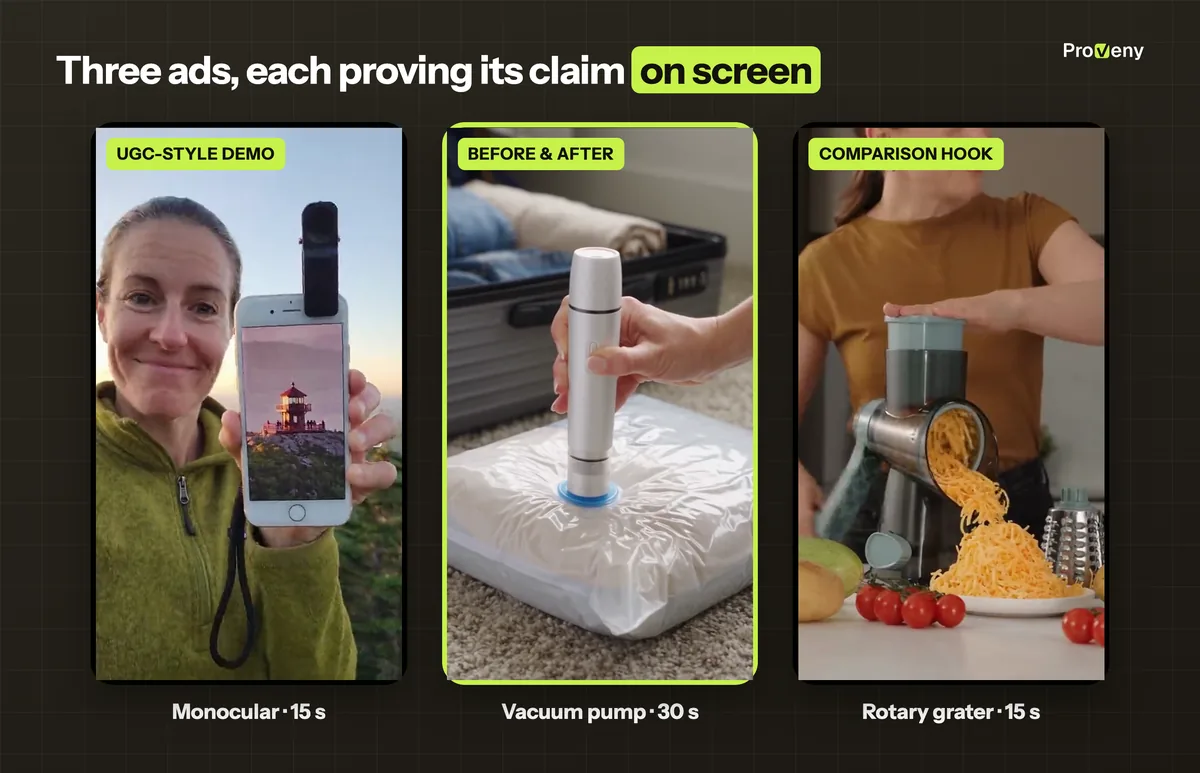
- Compact monocular telescope (UGC-style demo): On a summit, a woman talks to the camera, looks through the monocular at a tower far away, then clips it to her phone and the tower fills the screen. Two claims, the far view and the phone clip, fit in 15 seconds.
- Vacuum pump for storage bags (before and after): A puffy bag of clothes sits next to an open suitcase; the pump presses on the valve, the bag goes flat and slides in, and the suitcase closes. The bag is flat before second 15, as the 15-second rule asks; the rest of the 30-second ad packs it away.
- Manual rotary grater (comparison hook): The ad opens on a fight with a box grater, then one turn of the handle sends grated cheese and carrots onto the plate. The old way is the hook, so the product wins the comparison in seconds.

Drama, UGC or demo ads. Any concept, any product.
Every ad shows your product working accurately.
Making Demo Ads Without a Film Crew
Most of the advice above comes down to one thing: a steady supply of demo ads that show the product actually working, without waiting on samples, shoots or creators. That is the part we built Proveny to handle. The three example ads above were made with it.
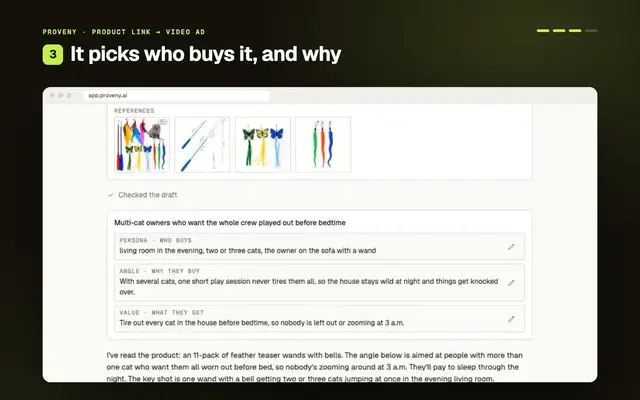
You paste a product link or upload product photos. Proveny studies the product, suggests an angle and a script you approve, and renders a 15-second to 10-minute ad of the product in use, in 9:16, 1:1 or 3:4, with captions.
- Product analysis before the shots: Proveny learns the product's look, the problem it solves and how people use it, then builds the ad around one key action, so the mechanism on screen matches the real product.
- Approval before rendering: You review and change the angle and every line of the script before the video is made.
- Many angles from one link: Proveny writes three different selling angles for the same product, and you can make a demo ad from each one to test. When one wins, the editor lets you reshoot a single scene.
- Research before you script: Proveny's ad swipe file extension saves competitor demo ads from the Meta Ad Library, Facebook, Instagram and TikTok with their copy and landing page, so you can see which key action other brands show before you choose yours.
Final Thoughts
A product demo video works because it answers the buyer's real question, does it work, in the first seconds. For paid social, that means 15 to 30 seconds, one key action, real hands, a visible result and claims you can prove.
The five-beat script, written backward from the key action, gives every demo the same backbone. A good place to start is one product, its key action written in one sentence, and three hooks built from there.
 HC
Written by
Founder of Proveny & TrueProfit
Harry Chu has spent 11 years in eCommerce doing the work behind the growth: running ads, testing creatives, reading the numbers, and scaling his own Shopify stores to 7 figures. He knows a good-looking ad account doesn’t mean much if the store isn’t growing.
Harry is the founder of Proveny and TrueProfit. On the Proveny blog, he shares what he’s learned from building and scaling his own stores: what to test, what the results actually mean, and when it’s time to stop spending on an idea that isn’t working.
No magic formula. No advice from the sidelines. Just practical lessons from someone who has had to make the numbers work in his own business.
More lessons from Harry